
Product Short Description
Product Overview:
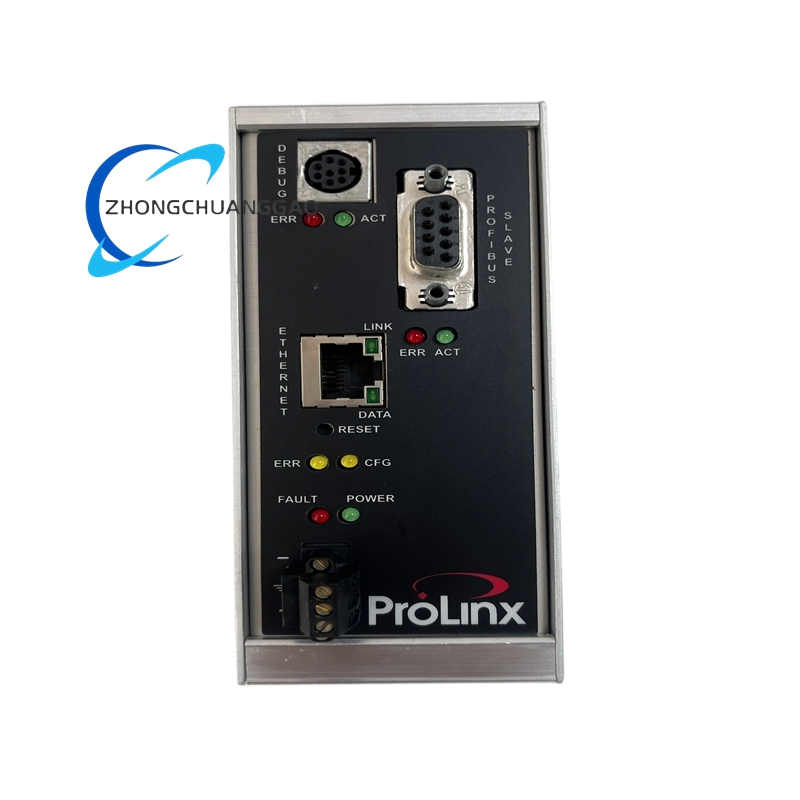
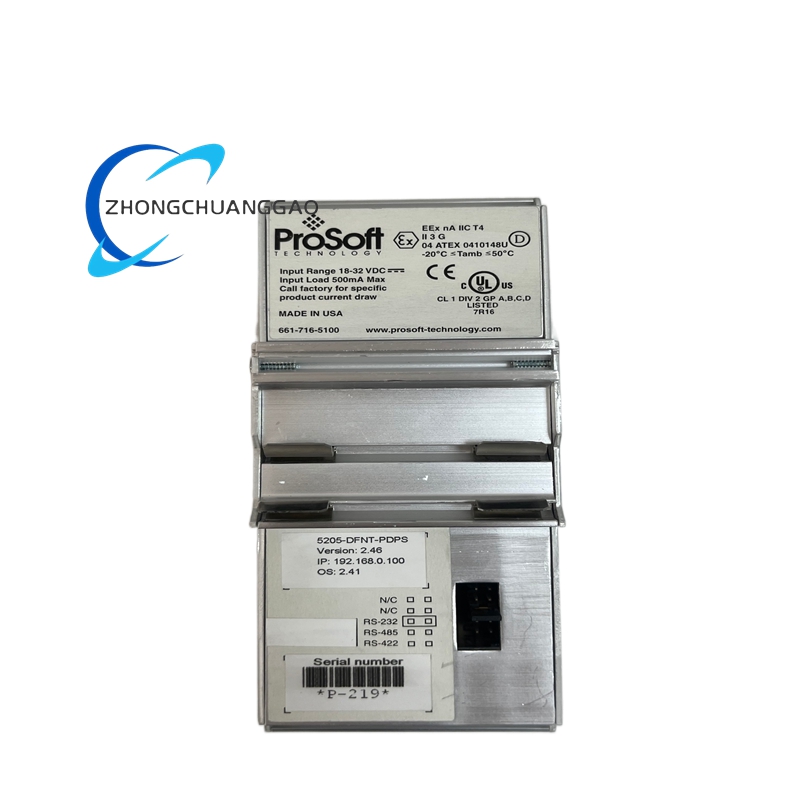
The ProSoft 5205-DFNT-PDPS is a DeviceNet slave to PROFIBUS DP slave communication gateway designed to bridge devices on a DeviceNet network into a PROFIBUS DP network without requiring a full protocol converter at each device. It enables seamless data exchange between Allen-Bradley/Rockwell DeviceNet devices and Siemens PROFIBUS DP master systems, allowing PLCs on either network to read and write data to devices on the opposite network transparently.
Description
Technical Specifications:
DeviceNet Side:
DeviceNet Protocol: DeviceNet v2.0 compliant (ODVA certified)
DeviceNet Baud Rates: 125 kbps, 250 kbps, 500 kbps (auto-detect)
DeviceNet Node Address Range: 0 to 63 (DIP switch selectable)
DeviceNet Connection Type: 5-pin M12 threaded connector (male)
DeviceNet Max I/O Data: 256 bytes input / 256 bytes output per node
DeviceNet Max Poll Rate: 10 ms (typical)
PROFIBUS DP Side:
PROFIBUS Protocol: PROFIBUS DP V0 / V1 compliant (Siemens compatible)
PROFIBUS Baud Rates: 9.6 kbps to 12 Mbps (auto-detect)
PROFIBUS Station Address Range: 1 to 126 (DIP switch selectable)
PROFIBUS Connection Type: 9-pin D-Sub (DB-9) female connector
PROFIBUS Max I/O Data: 244 bytes input / 244 bytes output per module
PROFIBUS Max Cycle Time: 1 ms to 65535 ms (configurable)
General Specifications:
Power Supply (DeviceNet Side): 24 VDC (18–30 VDC), 150 mA typical
Power Supply (PROFIBUS Side): 5 VDC bus-powered from PROFIBUS connector
Total Power Consumption: < 400 mW
Operating Temperature Range: 0°C to +60°C (32°F to 140°F)
Storage Temperature Range: -40°C to +85°C (-40°F to 185°F)
Ambient Humidity: 5% to 95% RH, non-condensing
Enclosure Rating: IP20 (DIN rail mounted, no enclosure)
EMC Compliance: EN 61131-2, CE Mark, FCC Part 15 Class A
UL Listing: UL 508 (Industrial Control Equipment)
cUL Listing: CSA C22.2 No. 142
Functional Features:
- Bidirectional Data Mapping: Supports up to 512 bytes of combined I/O data mapped between DeviceNet and PROFIBUS DP networks.
- Transparent Bridging: Acts as a slave on both networks simultaneously — no master-side configuration required on the gateway itself.
- DIP Switch Configuration: Node address and baud rate are set via 8-position DIP switches on the module housing.
- LED Status Indicators: Four LEDs for Power, DeviceNet Status, PROFIBUS Status, and Fault diagnostics.
- GSD File Available: Siemens GSD file is provided for seamless integration into STEP 7 / TIA Portal projects.
- EDS File Available: Rockwell EDS file is provided for integration into RSLogix 5000 / Studio 5000 projects.
- No Programming Required: Configuration is entirely hardware-based via DIP switches; no software tool needed for basic operation.
Material Composition:
Module Housing: Polycarbonate (UL 94 V-0 rated, flame retardant)
PCB Substrate: FR-4 glass epoxy, conformal coated
Connectors (DeviceNet): Nickel-plated brass, M12 5-pin A-coded
Connectors (PROFIBUS): Tin-plated steel, DB-9 female
DIP Switch Housing: PBT (polybutylene terephthalate) plastic
Mounting Clip: Stainless steel spring clip
Structural Features:
Form Factor: DIN rail mountable (35 mm top-hat rail, TS 35 / EN 60715)
Module Dimensions: 120 mm × 90 mm × 62 mm (W × H × D)
Weight: Approximately 120 grams
DIN Rail Clip: Integrated, no additional hardware required
Terminal Blocks: Screw-clamp terminals, 18–28 AWG wire size
Working Principle:
The 5205-DFNT-PDPS contains two independent communication ASICs — one for DeviceNet and one for PROFIBUS DP. The DeviceNet ASIC operates as a slave node, responding to poll requests from the DeviceNet master (typically an Allen-Bradley ControlLogix or CompactLogix PLC). Simultaneously, the PROFIBUS DP ASIC operates as a slave station, responding to cyclic I/O read/write requests from the PROFIBUS DP master (typically a Siemens S7-300/400 PLC). The module’s internal dual-port RAM buffer stores incoming data from one network and makes it available to the other network on the next poll cycle. Data mapping is pre-configured at the factory for 16 words input / 16 words output by default, with full remapping possible via the GSD/EDS file in the respective engineering tools. The module draws its 5V operating power from the PROFIBUS DP bus and receives 24VDC power from the DeviceNet trunk cable, making it fully bus-powered on both sides.
Key Advantages:
- Eliminates Protocol Barriers: Enables Rockwell and Siemens PLCs to communicate directly without a third-party protocol converter at the PLC level.
- Zero Programming Overhead: DIP switch configuration eliminates the need for gateway configuration software.
- Dual Certification: ODVA DeviceNet certified and Siemens PROFIBUS DP compatible via GSD file.
- Compact DIN Rail Form Factor: Saves panel space compared to rack-mounted protocol converters.
- Low Latency: Typical data exchange latency is < 10 ms end-to-end.
- Fail-Safe Behavior: If either network loses communication, the module stops updating data on the other network, preventing stale data propagation.
Applicable Industries:
- Automotive Manufacturing: Bridging Allen-Bradley DeviceNet sensors with Siemens PROFIBUS DP PLCs on mixed-vendor assembly lines
- Food & Beverage Processing: Integrating Rockwell packaging machines with Siemens batch control systems
- Oil & Gas: Connecting DeviceNet field instruments to Siemens DCS/PLC platforms
- Pharmaceutical Manufacturing: Linking Rockwell batch controllers with Siemens MES systems
- Water/Wastewater Treatment: Integrating DeviceNet SCADA devices with Siemens PROFIBUS DP RTU networks
- Material Handling: Connecting Allen-Bradley VFDs and sensors to Siemens conveyor control systems
Model Series:
The 5205-DFNT-PDPS is part of the ProSoft 5200 Series of gateway modules. Related models include:
| Model Number | Function |
|---|---|
| 5205-DFNT-PDPS | DeviceNet Slave to PROFIBUS DP Slave |
| 5204-DFNT-MDPS | DeviceNet Slave to Modbus DP Slave |
| 5203-DFNT-PDPM | DeviceNet Slave to PROFIBUS DP Master |
| 5202-DFNT-ABDF | DeviceNet Slave to Allen-Bradley DF1 Slave |
| 5201-DFNT-MNET | DeviceNet Slave to Modbus TCP/IP Slave |
| 5206-PDPM-DFNT | PROFIBUS DP Master to DeviceNet Slave |
| 5207-PDPM-ABDF | PROFIBUS DP Master to Allen-Bradley DF1 Slave |
All 5200 series modules share the same DIN rail form factor and DIP switch configuration method.
Installation Requirements:
- DIN Rail Mounting: Snap the module onto a 35 mm DIN rail (TS 35 / EN 60715 compliant). Ensure the rail is firmly secured to the panel.
- DeviceNet Wiring: Connect the 5-pin M12 cable to the DeviceNet trunk or drop line. Pin assignments: Pin 1 = 24VDC, Pin 2 = GND, Pin 3 = CAN-H, Pin 4 = CAN-L, Pin 5 = Shield/Drain.
- PROFIBUS Wiring: Connect the DB-9 cable to the PROFIBUS DP network. Pin assignments: Pin 3 = RxD, Pin 8 = TxD, Pin 1 = Shield/Drain.
- Termination: Install 120 Ω termination resistors at both ends of the PROFIBUS DP network. The 5205-DFNT-PDPS does not include built-in termination — external termination is mandatory.
- DeviceNet Termination: Install 121 Ω termination resistors at both ends of the DeviceNet trunk. The module includes an internal 121 Ω termination that can be enabled via DIP switch position 8.
- Power Isolation: Ensure the 24VDC DeviceNet power supply is isolated from the PROFIBUS DP network ground to prevent ground loops.
- Cable Length: Maximum DeviceNet cable length is 500 meters at 125 kbps. Maximum PROFIBUS DP cable length is 1200 meters at 1.5 Mbps (with repeaters).
Usage Precautions:
- Do not connect or disconnect cables while power is applied to either network — this will cause communication errors and may corrupt the module’s non-volatile configuration.
- Do not exceed the maximum node address of 63 on DeviceNet — addresses above 63 are reserved and will cause bus errors.
- Do not exceed the maximum station address of 126 on PROFIBUS DP — address 0 is reserved for the DP master.
- Verify DIP switch settings match the network configuration before powering up. Mismatched baud rates will prevent communication on that network.
- Do not install in locations with direct exposure to water, oil mist, or corrosive chemicals — the module is rated IP20 only.
- Do not apply more than 30 VDC to the DeviceNet power input — this will damage the onboard voltage regulator.
- Clean M12 and DB-9 connectors with isopropyl alcohol (≥ 99%) before initial connection.
- Replace the module if any LED indicates a persistent fault condition — the module does not support field repair.
- Update GSD/EDS files from the ProSoft website before commissioning to ensure compatibility with the latest firmware version.
Firmware Version:
Current Firmware: v3.21 (as of 2025)
Firmware Update Method: Via ProSoft Configuration Builder software using the USB programming port (Mini-USB on module housing)
Part Number Reference:
- ProSoft Part Number: 5205-DFNT-PDPS
- ProSoft Order Code: 5205DFNTPDPS
- ODVA Product ID: Registered under ProSoft Technology, Inc.
- Siemens Ordering Number: 6GK7 277-1AA10-0AA0 (cross-reference, not OEM)
Package Contents:
- 1× ProSoft 5205-DFNT-PDPS Module
- 1× M12 5-pin DeviceNet Cable (2 meter, pre-terminated)
- 1× DB-9 PROFIBUS DP Cable (2 meter, pre-terminated)
- 1× DIP Switch Reference Card
- 1× Quick Start Guide
Reviews
There are no reviews yet.