
Product Short Description
Product Introduction
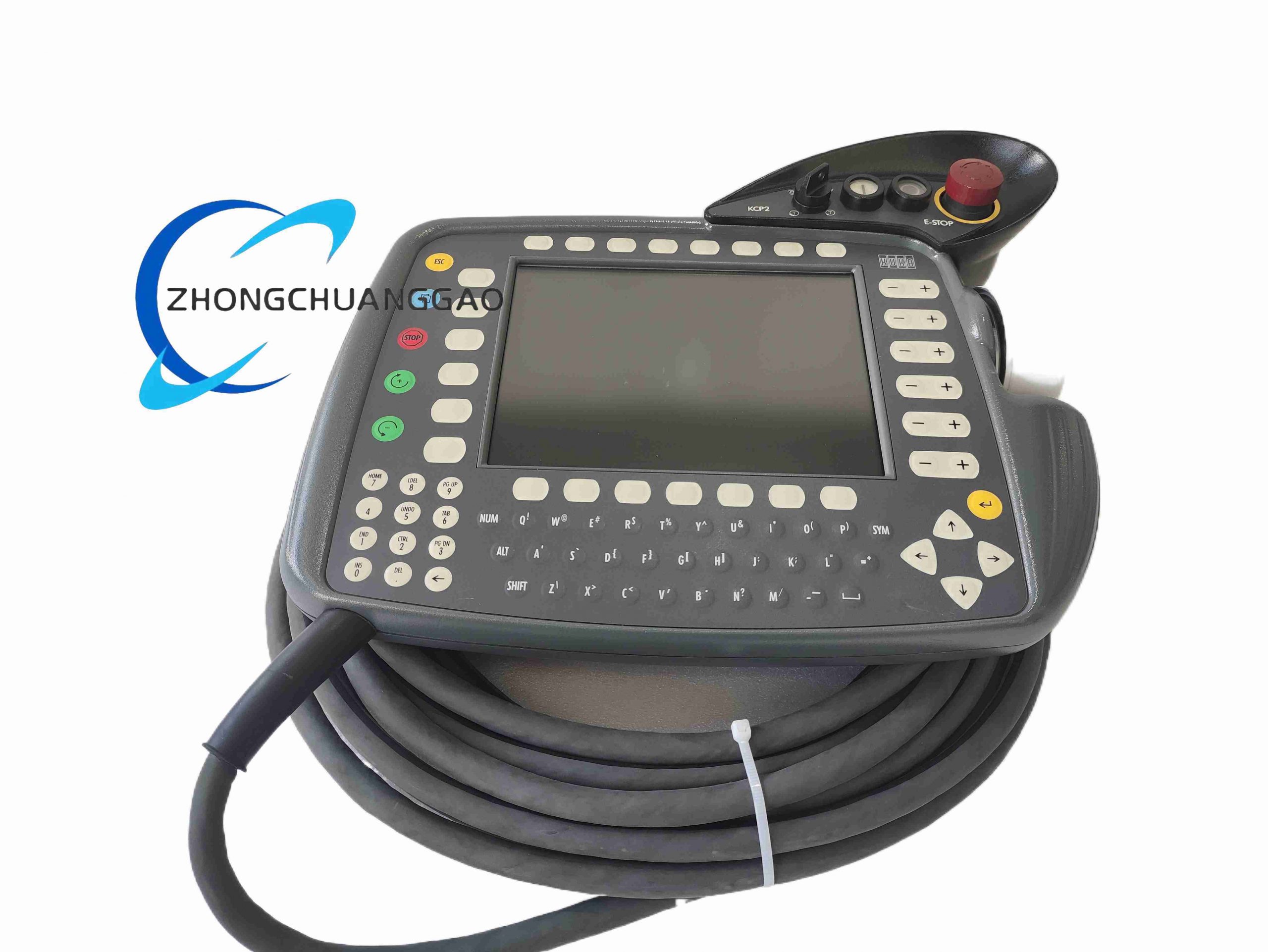
Ergonomic handheld human-machine interface dedicated to KUKA industrial robot control cabinets. Executes robot jogging motion, program creation, online debugging, real-time status monitoring, parameter configuration and safety interlock operation via CAN bus communication with robot main controller.
Description
Technical & Electrical Specifications
- Nominal Operating Voltage: 24 V DC
- Rated Current Draw: 0.5 A
- Integrated Display: 8-inch TFT color LCD
- Display Resolution: 640 × 480 VGA
- Onboard Storage: 128 MB RAM, 1 GB flash memory
- External Interfaces: 2 × USB 2.0 port, 1 × Ethernet communication port
- Communication Bus: CAN fieldbus to robot controller
- Standard Attached Cable Length: 10 m shielded industrial cable
- 6D Jog Joystick: 6-axis proportional motion control with variable speed scaling
- Safety Circuit Voltage: 24 V DC emergency stop enable loop
Mechanical & Material Specifications
- Overall Dimension (W × H × D): 336 mm × 266 mm × 138 mm
- Housing Material: Impact-resistant ABS composite, anti-slip textured grip
- Protection Rating: IP54
- Net Unit Weight: 3.5 kg
- Shock Resistance Rating: 15 g peak acceleration
- Vibration Resistance Rating: 1 g continuous vibration
- Key Input Type: Industrial wear-resistant membrane tactile keyboard + dedicated function shortcut keys
Environmental Parameters
- Operating Temperature Range: 0 °C ~ +45 °C
- Storage Temperature Range: -20 °C ~ +70 °C
- Relative Humidity Tolerance: 5% ~ 95% RH, non-condensing
Function Features
- Full robot axis jogging via proportional 6D joystick with multi-speed adjustment
- Complete robot KRL programming, editing, upload/download functionality
- Real-time display of joint coordinates, Cartesian positions, program execution status, fault alarm codes
- Three-position deadman enabling safety switch for manual jog mode interlock
- Hardwired red mushroom emergency stop button with normally closed safety circuit
- Mode selector switch: AUT / T1 / T2 / MAN operating modes
- USB data port for offline program import/export, firmware upgrade
- Ethernet interface for remote network diagnostic and controller synchronization
- Built-in system fault log storage with timestamped error records
Working Principle
24 V DC power and CAN communication signals transmit through 10 m shielded cable to KRC2/KRC3 robot controller. All operator key/joystick input converted to digital CAN bus data packets sent to controller CPU. Controller returns real-time robot motion, alarm and program data to render graphical display on TFT screen. Hardwired safety deadman and E-Stop circuits form hardwired interlock chain independent of software logic to cut robot drive power when safety conditions violated.
Advantage Highlights
- Ergonomic curved handheld design reduces operator fatigue during long shift programming
- IP54 dust/splash resistance for automotive, metal fabrication harsh workshop environments
- Hardwired independent safety circuits eliminate software single-point safety failure risks
- Integrated high-capacity flash storage stores thousands of robot motion programs locally
- Direct compatibility with all KRC2 ED05 and KRC3 robot control systems without adapter modules
- Vibration and shock certified for floor-mounted robot cell continuous operation
Applicable Industries
Automotive assembly lines, metal stamping & welding, aerospace component machining, consumer electronics packaging, logistics palletizing, foundry automation, machine tool tending
Installation Requirements
- Connect only to matching KRC2 / KRC3 robot controller dedicated teach pendant port
- Route 10 m cable away from high-current welding cables with minimum 30 cm separation
- Mount optional wall storage bracket inside robot safety cell when not in operation
- Maintain cable bend radius ≥ 8× cable outer diameter to prevent internal conductor breakage
- Verify E-Stop and deadman safety circuit continuity after every cable disconnection/reconnection
Usage Precautions
- Do not submerge unit in liquid; wipe spills immediately with dry lint-free cloth
- Avoid impact drops onto concrete floor; shock damage breaks internal safety wiring
- Disconnect 24 V DC power before opening rear housing cover for maintenance
- Only use manufacturer-specified replacement cables; third-party unshielded cables cause communication loss
- Do not operate manual jog mode without robot safety cell physical guarding engaged
- Regularly inspect membrane keyboard for liquid ingress or conductive metal particle accumulation
Reviews
There are no reviews yet.