
Product Short Description
Product Introduction:
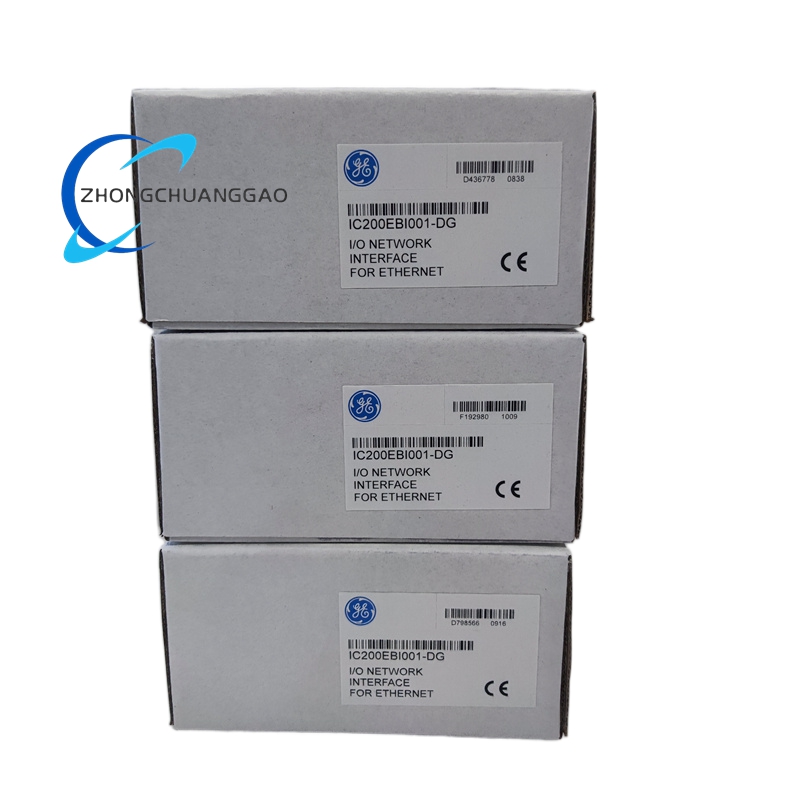
The IC200EBI001 is a dedicated Ethernet Network Interface Unit (ENIU) for GE’s VersaMax I/O system, functioning as an Ethernet slave module that controls and hosts I/O modules to enable distributed I/O architecture. It serves as a critical interface between VersaMax I/O modules and Ethernet networks, supporting Modbus TCP and Ethernet Global Data (EGD) protocols for real-time data exchange with host controllers (e.g., Series 90-30, VersaMax CPUs). The module features an RJ45 Ethernet port (10/100 Mbps auto-negotiation), 3 rotary switches for IP address configuration, and 5 status LEDs (PWR, OK, FAULTS, LAN, STAT) for at-a-glance diagnostics. It supports up to 64 I/O modules per station (with 7 expansion racks) in Release 1.1+, and integrates with VersaPro 2.0 or Remote I/O Manager 2.0 for configuration. The ENIU is powered via the VersaMax backplane and is designed for DIN-rail mounting in industrial environments requiring high-speed, reliable Ethernet connectivity for I/O control.
Description
- Technical Specifications:
- Network Interface: 1 x RJ45 port, 10/100 Mbps (10Base-T/100Base-TX), auto-negotiation, full/half-duplex support
- Protocols: Modbus TCP (Class 0/1), Ethernet Global Data (EGD); up to 10 Modbus TCP connections
- I/O Capacity: Release 1.0: 8 modules (no expansion); Release 1.1+: 64 modules (7 expansion racks)
- Data Memory: 512 bytes input, 512 bytes output (total 1024 bytes); 128 bytes fault data
- Configuration: 3 rotary switches for IP address (default subnet 195.0.0.x); Telnet/FTP for temporary IP assignment; auto-configuration or software-based setup
- Power Consumption: 5 VDC @ 175 mA, 3.3 VDC @ 425 mA (backplane-powered)
- Mounting: 7.5 mm × 35 mm DIN rail (conductive finish required); panel-mountable with adapter
- Dimensions: 133.4 mm (5.25 in) × 85.9 mm (3.4 in) × 70 mm (2.75 in) (excluding DIN-rail height)
- Weight: 0.14 kg (0.31 lbs)
- Environmental Ratings: Operating temperature 0°C to +60°C; storage temperature -40°C to +85°C; humidity 5%–95% (non-condensing)
- Isolation: 250 VAC continuous (field-to-logic/frame ground); 1500 VAC for 1 minute (surge protection)
- Function Features:
- Dual Protocol Support: Enables Modbus TCP for SCADA integration and EGD for real-time I/O/diagnostics data exchange
- Scalable I/O Expansion: Supports 8 (Release 1.0) or 64 (Release 1.1+) I/O modules with expansion racks, adapting to small/large systems
- Flexible Configuration: Rotary switches for quick IP setup; software tools (VersaPro, Remote I/O Manager) for advanced network settings
- Real-Time Diagnostics: 5 status LEDs provide instant feedback on power, module health, Ethernet link, and data activity
- Hot Insertion: Allows I/O module replacement without powering down the ENIU, minimizing downtime
- EMC Compliance: Requires grounded DIN rail (conductive, unpainted) to reduce electromagnetic interference in industrial environments
- High-Speed Data Transfer: 10/100 Mbps Ethernet port with auto-negotiation ensures optimal network performance
- Application Scenarios:
- Distributed I/O Architecture: Connects VersaMax I/O modules to Ethernet networks in automotive, packaging, and material handling systems, reducing wiring costs
- Process Control Systems: Integrates with analog I/O modules in chemical, oil/gas, and water treatment plants for Modbus TCP-based monitoring/control
- Power Generation/Distribution: Links switchgear, transformers, and generators to SCADA systems via Modbus TCP for remote data acquisition
- Manufacturing Automation: Facilitates real-time data exchange between production line controllers and I/O modules in food & beverage, pharmaceutical, and electronics assembly lines
- Building Automation: Connects HVAC, lighting, and security systems to VersaMax controllers using EGD or Modbus TCP protocols
- Remote Monitoring: Enables cloud/on-premise SCADA integration for remote I/O diagnostics and control in geographically dispersed facilities
- Installation & Maintenance:
- Mounting: Snap onto grounded 7.5 mm × 35 mm DIN rail (conductive, unpainted surface) for EMC compliance; use panel-mount adapter for vibration-prone areas
- Configuration: Set IP address via rotary switches (default 195.0.0.x); use VersaPro 2.0 or Remote I/O Manager 2.0 to configure protocols, I/O mapping, and EGD exchanges
- Wiring: Use Cat 5e/Cat 6 shielded cables for Ethernet connections; ground shields at the ENIU terminal block to minimize noise
- Module Installation: Align I/O modules with carrier keying, push until latched; verify OK LED on ENIU and I/O modules for normal operation
- Diagnostics: Use LED indicators to troubleshoot (e.g., FAULTS LED = module/network error; LAN LED = link status); access fault data via Modbus TCP or EGD
- Firmware Update: Update via FTP/Telnet or VersaPro to ensure compatibility with latest protocols and features (latest known firmware: v1.32)
Reviews
There are no reviews yet.